AWS re/Start Lab · Bases de Datos

Introducción a Amazon DynamoDB

Creación de una tabla en DynamoDB, inserción de elementos con esquema flexible, consulta mediante Query y Scan, y eliminación de la tabla.

Lab Summary

Created a DynamoDB table named Music with Artist as the partition key and Song as the sort key. Populated the table with three items demonstrating NoSQL schema flexibility, queried data using both indexed lookups and full table scans, and then deleted the table.

Table Creation

Creating a Music table with Artist (partition key) and Song (sort key) using the DynamoDB console.

Schema-Free Items

Adding items with varying attributes to demonstrate NoSQL flexibility.

Query vs Scan

Retrieving data through indexed queries (fast) versus full table scans (flexible but slower).

AWS Services Used

Primary services involved in this lab.

Amazon DynamoDB

Fully managed NoSQL database service with single-digit millisecond latency at any scale.

Step-by-Step Walkthrough

Detailed documentation of each task performed in the DynamoDB console.

01

Create a new table

  • Navigated to DynamoDB in the AWS Management Console.
  • Chose Create table.
  • Set Table name: Music.
  • Set Partition key: Artist (String), Sort key: Song (String).
  • Left default settings for indexes and provisioned capacity.
  • Chose Create table and waited until the Music table status showed Active.
02

Add data

  • Selected the Music table, chose Actions > Create item.
  • Created Item 1: Artist="Pink Floyd", Song="Money", Album="The Dark Side of the Moon" (String), Year=1973 (Number).
  • Created Item 2: added an extra Genre attribute (String) to demonstrate schema flexibility.
  • Created Item 3: Artist="Psy", Song="Gangnam Style", added extra LengthSeconds attribute (Number) = 219.
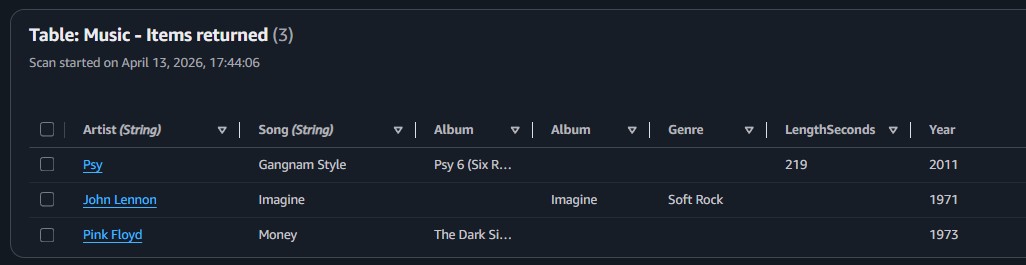
Note: In DynamoDB, only the partition key and sort key are required. Each item can include different attributes, which is a fundamental difference from relational databases that enforce a fixed schema.
03

Modify an existing item

  • Located Psy's item in the Music table.
  • Changed the Year attribute from 2011 to 2012.
  • Saved the changes.
04

Query the table

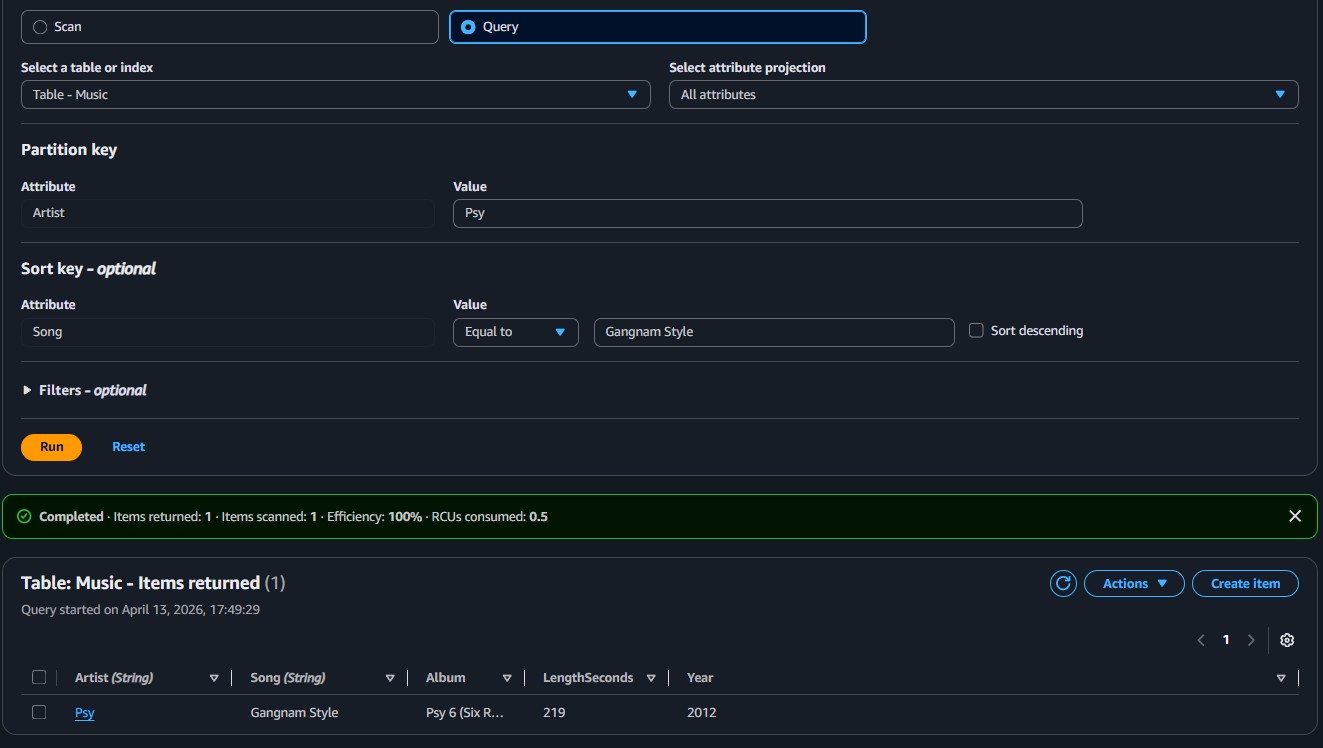
  • Query method: Expanded Scan/Query items, selected Query.
  • Entered partition key: Psy, sort key: Gangnam Style.
  • Result: the matching item returned instantly (indexed lookup).
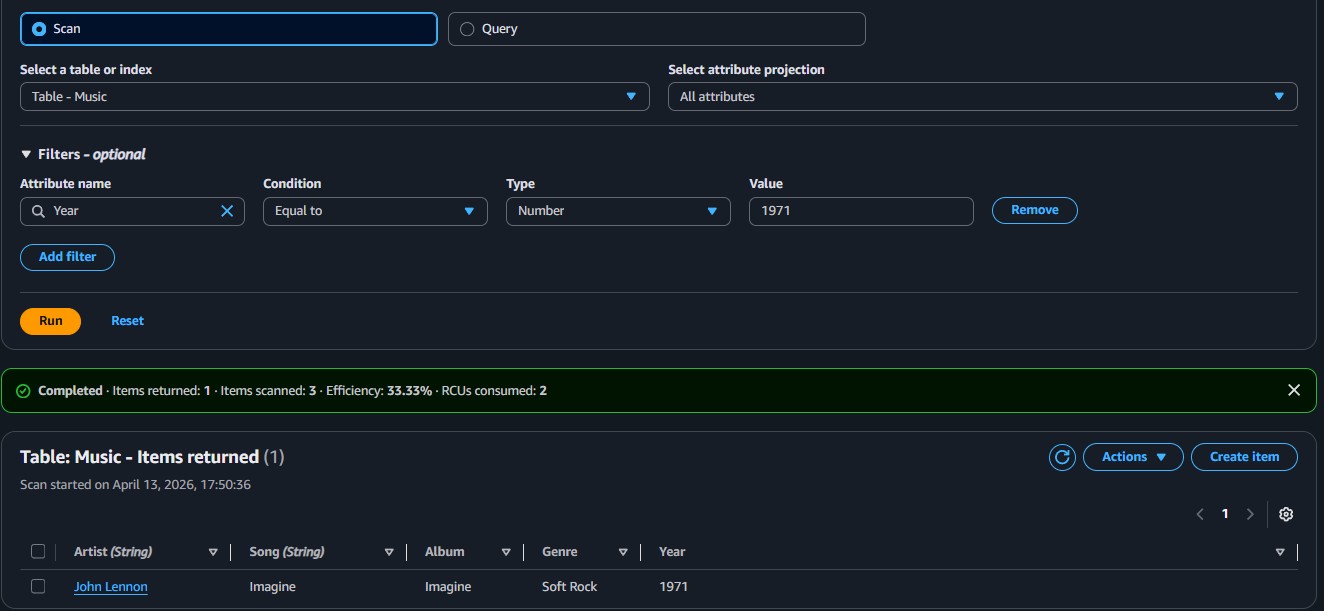
  • Scan method: Selected Scan, added filter: Attribute name Year, Type Number, Value 1971.
  • Result: only the matching item displayed (but scans the entire table).
Performance note: A query operation uses the primary key and is fully indexed, making it fast. A scan reads every item in the table and applies filters afterward, which is less efficient for large datasets.
05

Delete the table

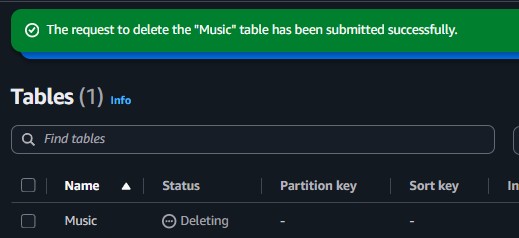
  • Navigated to DynamoDB > Tables > Update settings.
  • Selected the Music table, chose Actions > Delete table.
  • Typed delete to confirm, and the table was removed.
Key Learnings

What Was Actually Learned

How to create a DynamoDB table with partition key and sort key.
That NoSQL tables allow each item to have different attributes (schema flexibility).
The difference between Query (indexed, fast) and Scan (full table read, less efficient).
How to modify and delete items and tables in the DynamoDB console.

Technical Conclusion

DynamoDB is a fully managed NoSQL database where schema flexibility allows each item to carry different attributes. The choice between Query and Scan depends on the use case: Query for precise key-based lookups, Scan for broad filtering across the full dataset.