AWS re/Start Lab · Networking

Internet Protocol Troubleshooting Commands

This lab bridges the gap between networking theory and practical administration by demonstrating how standard Linux terminal utilities correspond to specific layers of the Open Systems Interconnection (OSI) model.

Lab Summary

Accessed an Amazon Linux EC2 Command Host via SSH to execute network diagnostics. The process moved from Layer 3 routing (ping/traceroute), mapping connectivity to public endpoints, into Layer 4 (netstat/telnet) verifying port listening states and TCP handshakes, and concluding at Layer 7 (curl) validating HTTP responses.

Troubleshooting by OSI Layer

Mapping commands to the OSI model narrows down where a communication failure is occurring.

Layer 3 Network

ping & traceroute

Layer 3 dictates routing and IP addresses. These tools utilize ICMP (Internet Control Message Protocol) to verify that a target is logically reachable on the network.

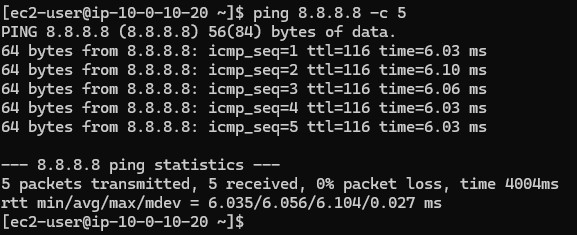
$ ping 8.8.8.8 -c 5

Used to test raw connectivity. In an AWS scenario, testing an EC2 instance connection ensures security groups or Network ACLs are properly allowing ICMP echo requests.
$ traceroute 8.8.8.8

Used to identify routing latency or packet loss. If a customer reports a slow connection, traceroute reveals the path ("hops") taken. Packet loss at specific hops indicates whether the issue lies with the local ISP, intermediary networks, or the AWS destination. Three asterisks (***) indicate a failed hop.


Layer 4 Transport

netstat & telnet

Layer 4 manages end-to-end communication (TCP/UDP protocols) and port numbers. Troubleshooting here helps identify if a service is actively listening or if a port is forcefully blocked by a localized firewall/security group.

$ netstat -tp

Often used for security scans, providing a snapshot of active, established TCP connections and the listening state of host ports.

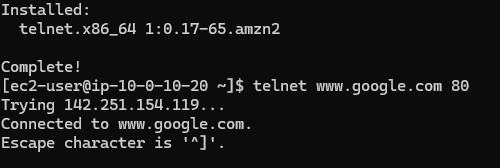
$ telnet www.google.com 80

While often considered a legacy remote-access tool, telnet is an excellent diagnostic tool for probing stateful TCP connections at destination ports. If connection returns "Connection refused", a firewall or security group is likely blocking port access manually.

Layer 7 Application

curl

Layer 7 is where software directly interfaces with network services (HTTP/HTTPS, FTP, etc.). Diagnostics here confirm that the application server itself (like Apache or Nginx) is answering formatted requests successfully.

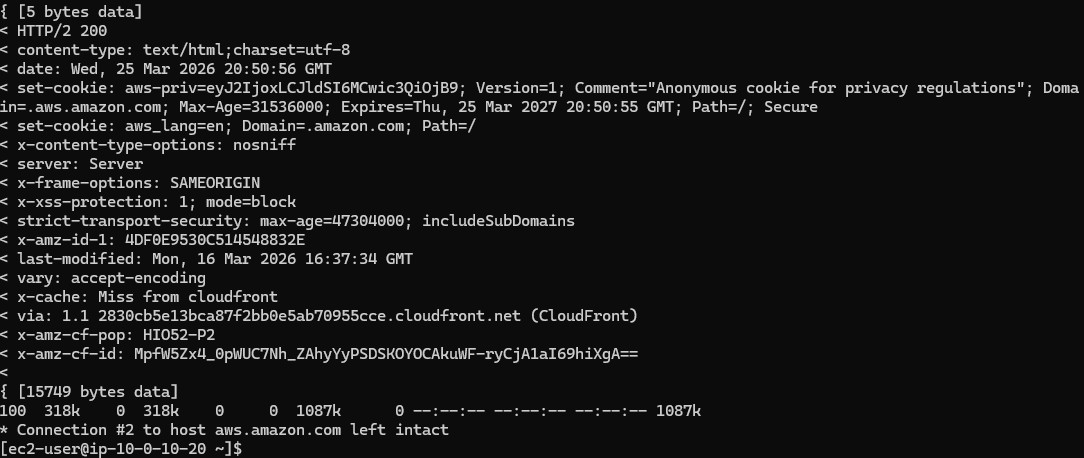
$ curl -vLo /dev/null https://aws.com

Uses URLs rather than raw IP/ports, transferring data via established protocols. The -v verbose flag is excellent for diagnosing SSL/TLS handshakes or investigating specific HTTP response codes (e.g., verifying a 200 OK response vs. a 500 Server Error).

Key Learnings

Flags & Options Breakdown

ping -c: Specifies the exact "count" of requests to send, preventing an infinite ping loop in the terminal.
netstat -tp: Lists established connections (t) and attempts to display PID/Program name (p). Note: displaying PIDs often requires root privileges.
curl -v: Instructs curl to output highly detailed "verbose" logging, perfect for debugging HTTP headers and response behavior.
curl -o /dev/null: Discards the actual downloaded body data (like the raw HTML source code) to keep terminal logs clean when only headers matter.

Technical Conclusion

When a service becomes inaccessible, network administrators must isolate the scope of the problem.

Understanding how utilities map to the OSI model provides a structured framework. Rather than guessing if an Apache service crashed (Layer 7) or if the host machine entirely dropped off the subnet (Layer 3), tools like traceroute, telnet, and curl serve as specific diagnostic probes to isolate the point of failure methodically.