AWS re/Start Lab · Networking

Create Subnets and Allocate IP Addresses in a VPC

This lab walks through the process of creating an Amazon VPC from scratch for a customer who needs approximately 15,000 private IP addresses and a public subnet with at least 50 addresses. The correct CIDR blocks and private IP ranges are calculated and applied.

Lab Summary

Created a VPC named First VPC with CIDR block 192.168.0.0/18 (16,384 IPs) and a public subnet with CIDR 192.168.1.0/26 (64 IPs) using the VPC Wizard.

CIDR Planning

Identified the correct private IP range (192.168.x.x per RFC 1918) and calculated appropriate CIDR blocks: /18 for the VPC (16,384 IPs) and /26 for the public subnet (64 IPs).

VPC Creation

Used the VPC Wizard to create a VPC with a single public subnet, including an Internet Gateway and route table. Verified successful creation in the console.

AWS Services Used

Amazon VPC

Created a Virtual Private Cloud using the VPC Wizard. The wizard automatically configured the VPC with a public subnet, route table, and Internet Gateway.

Internet Gateway

Automatically created and attached by the VPC Wizard to enable internet connectivity for resources in the public subnet.

Step-by-Step Walkthrough

Documentation of the VPC creation process following the customer's requirements.

01

Analyze the customer's requirements

  • The customer (Paulo) needs approximately 15,000 private IPs in the VPC.
  • The VPC CIDR should use a 192.x.x.x private range.
  • The public subnet needs at least 50 IP addresses.
  • Consulted RFC 1918 to confirm the valid private range: 192.168.0.0/16.
  • Used the subnet calculator to find the right CIDR: /18 provides 16,384 addresses (the smallest block above 15,000).
VPC CIDR Block 192.168.0.0/18
Available IPs 16,384
Public Subnet CIDR 192.168.1.0/26
Subnet IPs 64
RFC 1918 Range 192.168.0.0/16
Q: Why are private IP addresses used within the VPC? Private IPs are not reachable from the internet. This keeps communication between resources within the VPC private and secure. Only resources that need internet access get a public IP in addition to their private one.
02

Create the VPC using the VPC Wizard

  • Navigated to the VPC service in the AWS console.
  • Selected Launch VPC Wizard and chose VPC with a Single Public Subnet.
  • Configured the VPC with the following parameters:
IPv4 CIDR block 192.168.0.0/18
IPv6 CIDR block No IPv6
VPC name First VPC
Public subnet CIDR 192.168.1.0/26
Availability Zone No Preference
Subnet name Public subnet
  • Selected Create VPC. The wizard automatically created the VPC, public subnet, route table, and Internet Gateway.
Q: Which VPC configuration was used? "VPC with a Single Public Subnet" was selected. This is the simplest configuration for the customer's needs, since they only require one public subnet for internet-facing resources. Other options include multiple subnets or private-only subnets.
Q: Why are there private and public subnets? Public subnets are for instances that need internet access (via a public IP and an Internet Gateway). Private subnets keep instances isolated from the internet. Instances in a private subnet that need internet connectivity would require a NAT gateway.
03

Verify the VPC was created successfully

  • After creation, the console displayed "VPC Successfully Created".
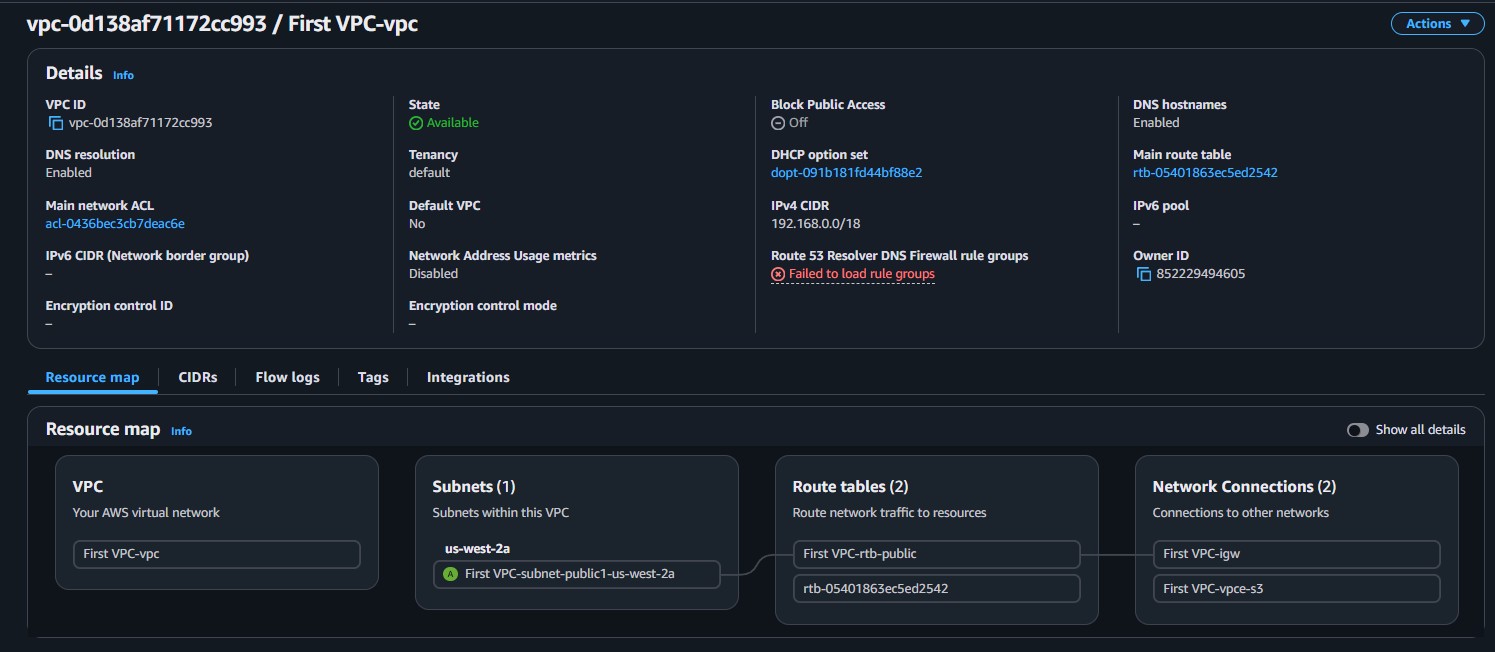
  • Navigated to Your VPCs in the left menu and confirmed First VPC was listed with CIDR 192.168.0.0/18 and state Available.
  • The resource map showed the complete architecture: VPC, 1 subnet (First VPC-subnet-public1), 2 route tables, and network connections (IGW + S3 endpoint).

Key Learnings

What Was Learned

How to calculate the correct CIDR block based on the number of IP addresses needed.
The RFC 1918 private IP ranges: 10.0.0.0/8, 172.16.0.0/12, 192.168.0.0/16.
How to use the VPC Wizard to create a VPC with a public subnet, route table, and Internet Gateway in one step.
The subnet CIDR must be smaller than the VPC CIDR, and both must be within the same private range.

Technical Conclusion

This lab demonstrated the foundational process of creating a VPC from the customer's requirements. The key skill is translating business needs (e.g., "I need 15,000 IPs") into technical configurations (e.g., a /18 CIDR block in the 192.168.x.x range).

The VPC Wizard simplifies the process by bundling the VPC, subnet, route table, and Internet Gateway into a single workflow. For production environments, understanding each component individually becomes important, as covered in the next lab.