AWS re/Start Lab · Compute & Serverless

Working with AWS Lambda — Sales Analysis Report

Deployed a serverless solution with two chained Lambda functions: one extracts sales data from a MySQL database running on EC2 inside a VPC, the other formats the report and publishes it to SNS for email delivery. Includes a real troubleshooting cycle around VPC networking and a scheduled trigger via EventBridge.

Architecture

Two Lambda functions chained behind an EventBridge schedule. The orchestrator (salesAnalysisReport) invokes the extractor (salesAnalysisReportDataExtractor), which queries the café MySQL database living inside a private VPC subnet. The orchestrator then publishes a formatted email message to SNS.

#Action
1An EventBridge / CloudWatch Events rule fires the salesAnalysisReport Lambda daily at 8 PM UTC, Monday – Saturday.
2salesAnalysisReport invokes salesAnalysisReportDataExtractor synchronously, passing DB connection params from SSM Parameter Store.
3salesAnalysisReportDataExtractor runs an analytical SQL query against the cafe_db MySQL database on an EC2 LAMP instance.
4The result set is returned to salesAnalysisReport as JSON.
5salesAnalysisReport formats the report into a plain-text message and publishes it to the salesAnalysisReportTopic SNS topic.
6SNS fans the message out to the email subscriber (the administrator).

IAM Roles (pre-provisioned)

salesAnalysisReportRole — used by the orchestrator. Grants sns:Publish, ssm:GetParameter and lambda:InvokeFunction.

salesAnalysisReportDERole — used by the extractor. Includes AWSLambdaVPCAccessExecutionRole so Lambda can create the ENIs needed to reach the VPC, plus CloudWatch Logs.
Why two Lambdas?

The extractor is the only function that needs to live inside the VPC (it must reach the MySQL EC2 instance). Keeping the orchestrator outside the VPC lets it publish to SNS over the public AWS endpoint without needing a NAT gateway or VPC endpoint, and keeps cold-start cheap.

Walkthrough

Tasks with screenshot evidence are documented in detail; tasks without evidence are summarized in a few lines so the report stays a logbook, not a transcription of the guide.

01

Create the Lambda Layer for PyMySQL

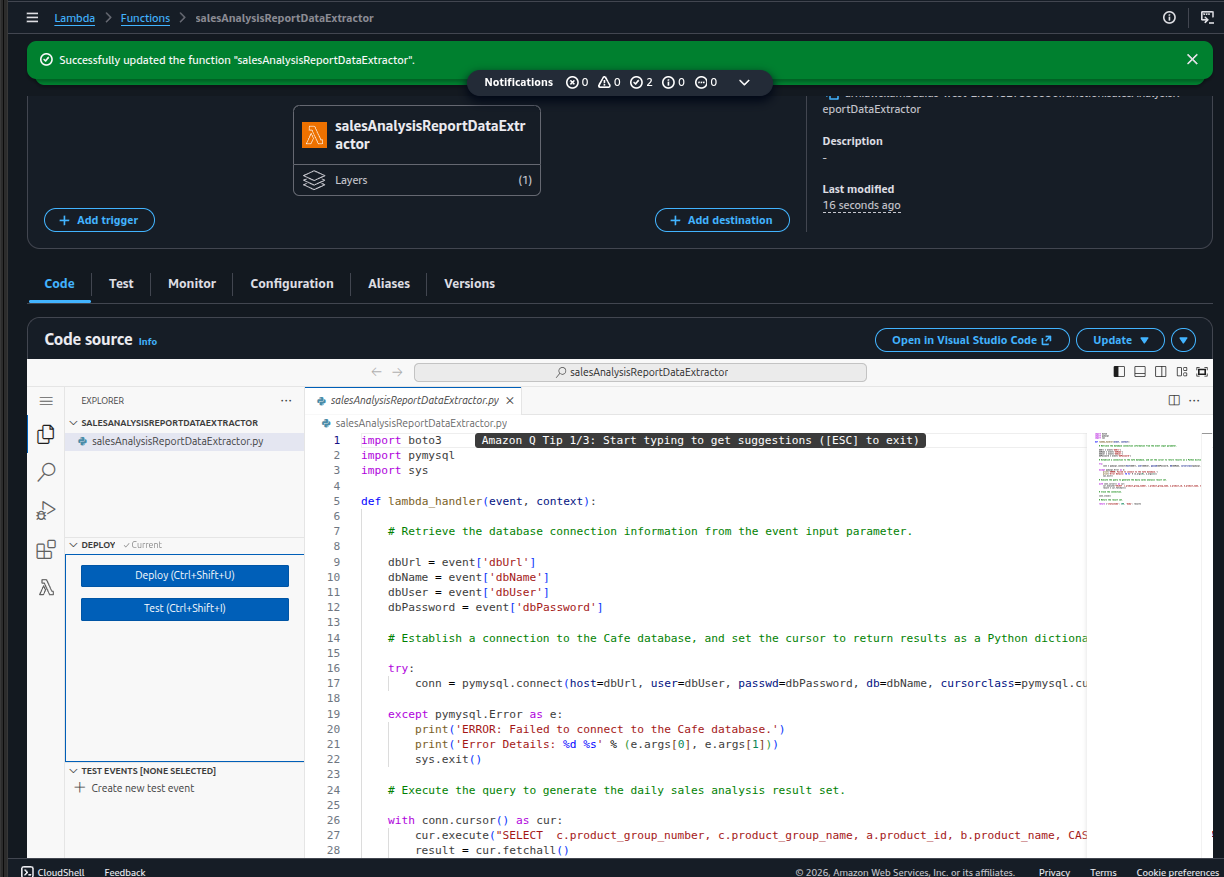
Uploaded pymysqlLibrary.zip to the Layers section of the Lambda console as pymysqlLibrary, compatible with Python 3.9. The zip respects the Lambda path convention (python/lib/python3.X/site-packages/…) so the runtime can import pymysql with no extra configuration. The layer is later attached to the extractor function — visible as Layers (1) in the next screenshot.

02

Create the salesAnalysisReportDataExtractor Lambda function

  • Created from scratch in the Lambda console: runtime Python 3.9, execution role salesAnalysisReportDERole.
  • Uploaded the provided salesAnalysisReportDataExtractor-v2.zip as the function code.
  • Attached the pymysqlLibrary layer — the function now imports pymysql at runtime.
  • The handler reads four parameters from the test event payload — dbUrl, dbName, dbUser, dbPassword — and opens a connection with pymysql.connect(...). The SQL aggregates daily sales grouped by product.
03

Attach the extractor to the Café VPC

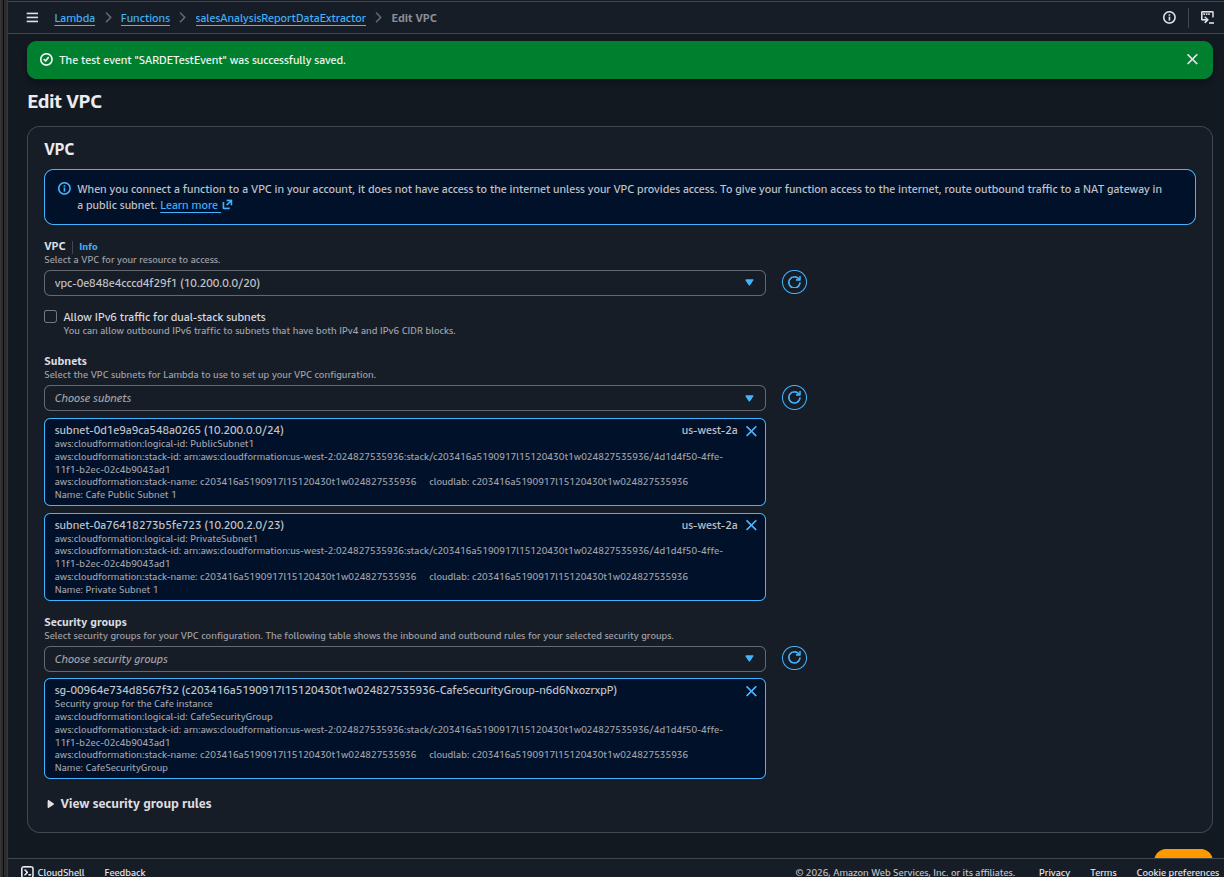
  • Edited Configuration → VPC on the extractor function.
  • VPC: vpc-0e848e4cccd4f29f1 (10.200.0.0/20) — the Café VPC.
  • Subnets: Cafe Public Subnet 1 and Cafe Private Subnet 1 (us-west-2a).
  • Security group: CafeSecurityGroup — the same SG attached to the MySQL EC2 instance.
Why this matters: Once a Lambda joins a VPC, it inherits the network constraints of that VPC. The AWSLambdaVPCAccessExecutionRole in the role is what lets Lambda attach those ENIs on demand.
04

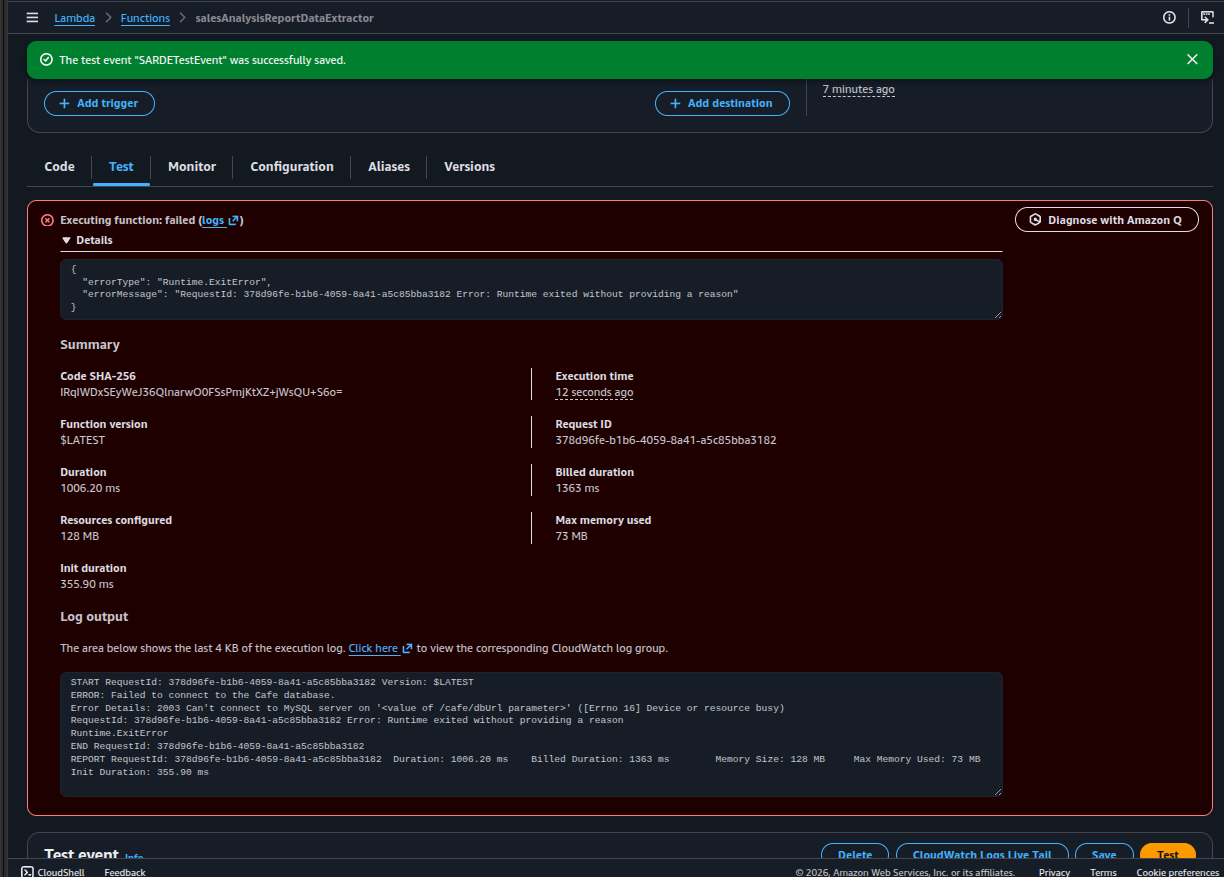
First test run — function fails

  • Created a test event SARDETestEvent with the four DB parameters as JSON.
  • Triggered Test. The function ran for ~1 second and exited with Runtime.ExitError.
  • The log clearly identifies the cause: Failed to connect to the Cafe database, error 2003, Can't connect to MySQL server.

The full error from the log:

ERROR: Failed to connect to the Cafe database.
Error Details: 2003 Can't connect to MySQL server on '<value of /cafe/dbUrl parameter>' ([Errno 16] Device or resource busy)
Runtime.ExitError

This is the most honest piece of evidence in the lab: it proves the extractor was actually deployed, tested, and reached the network layer before failing. The next section diagnoses and fixes it.

Troubleshooting · The MySQL Timeout

The failure above was the most useful moment of the lab. Walking through it forced a real diagnosis of how Lambda networking interacts with EC2 security groups.

Lambda can't connect to MySQL on the Café EC2 instance

Symptom

Runtime.ExitError after ~1 s. Log: 2003 Can't connect to MySQL server.

Diagnosis

The function reached the network and tried TCP/3306, but the connection timed out. DNS works, the IP is reachable, so the problem is at L4 — a firewall is dropping the packets.

Root cause

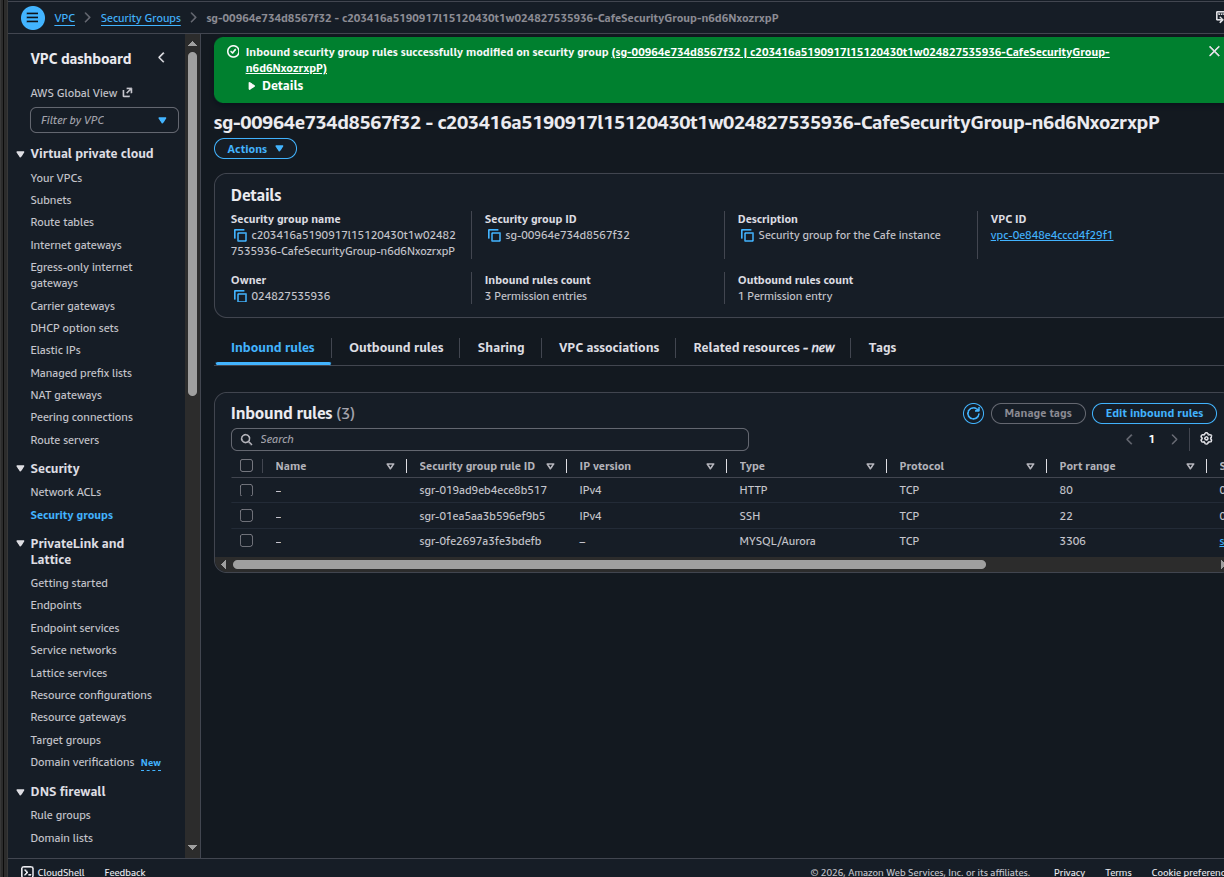
CafeSecurityGroup had inbound rules for HTTP/80 and SSH/22, but nothing for MySQL/Aurora 3306. The Lambda ENI lives in the same SG, but an SG does not allow internal traffic unless an explicit rule says so.

Fix

Added an inbound rule: MYSQL/Aurora · TCP · 3306 with source = CafeSecurityGroup (self-reference). Now any ENI in that SG — including the Lambda's — can open a TCP connection to 3306 on any other ENI in the same SG.

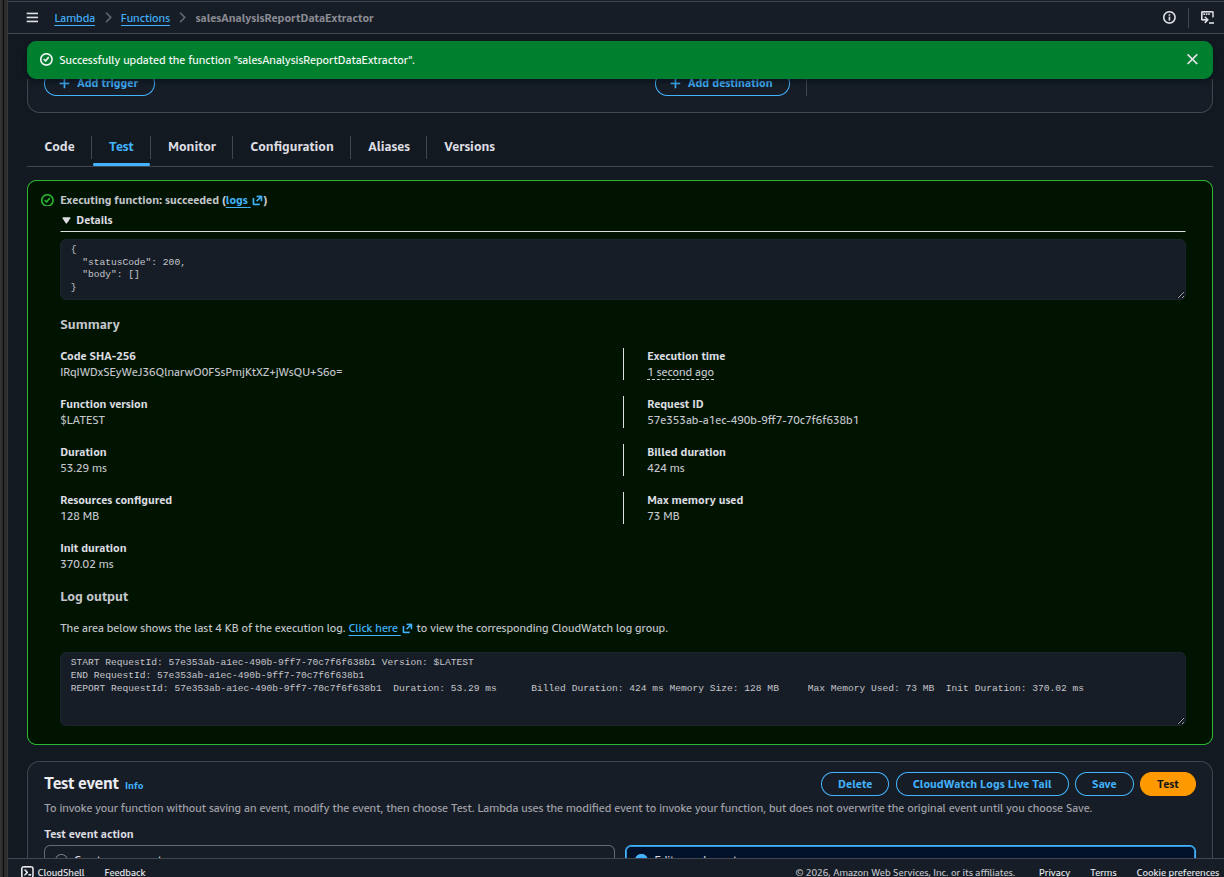
Verification: after placing some orders on the Café website and re-running the test, the body became a non-empty list with product / quantity tuples — confirming the SQL query and the PyMySQL layer were working end to end.

Orchestrator Lambda + SNS

The second Lambda formats the email and publishes to SNS. The interesting bit is that it was created from the AWS CLI, not the console — exactly the kind of one-liner that belongs in a SysOps logbook.

05

Create the SNS topic and subscribe an email

Created a standard SNS topic salesAnalysisReportTopic in us-west-2, then added an Email subscription with the personal Gmail address. Confirmed the subscription via the "AWS Notification — Subscription Confirmation" email. The topic ARN is later wired into the orchestrator function as an environment variable.

06

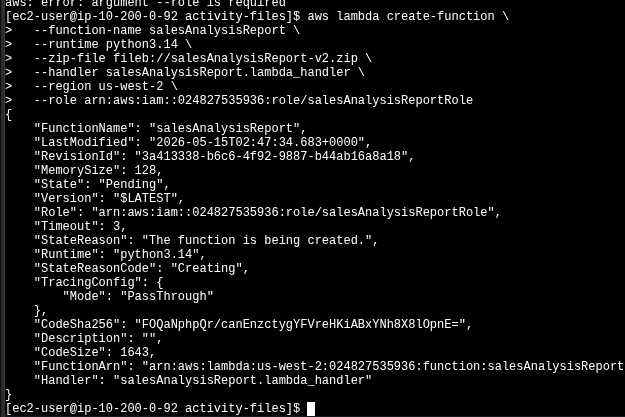
Create salesAnalysisReport via AWS CLI

Connected to the EC2 instance via Session Manager / EC2 Instance Connect and ran aws lambda create-function directly. The zip was uploaded to the instance beforehand by the lab provisioning.

aws lambda create-function \
  --function-name salesAnalysisReport \
  --runtime python3.9 \
  --zip-file fileb://salesAnalysisReport-v2.zip \
  --handler salesAnalysisReport.lambda_handler \
  --region us-west-2 \
  --role <salesAnalysisReportRoleARN>
Runtime discrepancy: the official lab guide specifies --runtime python3.9, but the screenshot shows the function created with python3.14. The CLI output is the real one; the command is shown above with the guide's requested runtime for fidelity, and the divergence is documented here because it shows the lab actually being executed with whatever runtime was current at the time.

After creation, the orchestrator was configured with an environment variable topicARN pointing to the SNS topic ARN — the Python code reads it at line ~26 to publish the report.

07

End-to-end test — the email arrives

  • Invoked salesAnalysisReport manually from the console with an empty test event.
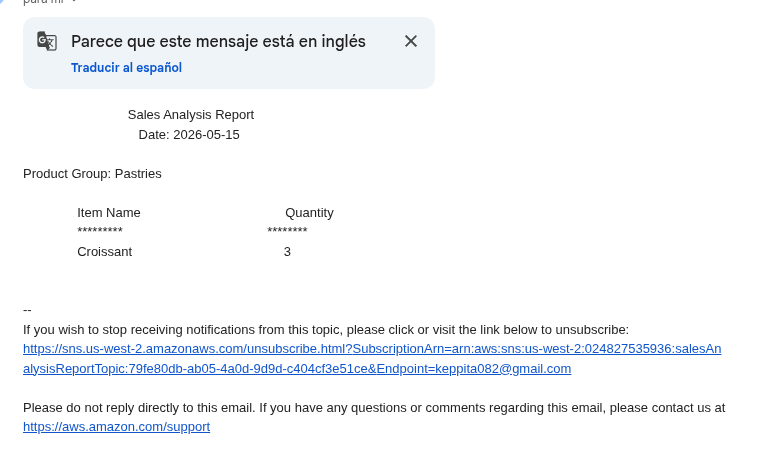
  • The orchestrator pulled DB params from SSM, invoked the extractor, received the result set, formatted the message, and called SNS:Publish.
  • SNS delivered the message to the subscribed Gmail address.
08

Schedule the daily run with EventBridge

Created an EventBridge rule with a cron schedule expression and the salesAnalysisReport Lambda as target. AWS cron has 6 fields in UTC:

cron(Minutes Hours Day-of-month Month Day-of-week Year)
# Example for the lab — 8 PM UTC, Monday through Saturday:
cron(0 20 ? * MON-SAT *)

Either Day-of-month or Day-of-week must be ? — they can't both be specified, because that would over-constrain the date. No screenshot — the rule creation page itself is not interesting, what matters is the expression above.

Key Learnings

What This Lab Actually Taught

A Lambda function joining a VPC is just another ENI — it obeys the same security group rules as an EC2 instance. "Same SG" is not "allowed"; you still need an explicit self-referencing inbound rule.
Layers are the right place for shared native or third-party dependencies (here, PyMySQL) — they keep the function package small and reusable across functions.
AWS CLI is often the better way to create or update a Lambda function: it's reproducible, scriptable, and fits a CI pipeline. The console is good for inspection, not for creation.
EventBridge cron uses 6 fields in UTC, and ? is mandatory in one of the two day fields. Forgetting this is the #1 reason scheduled rules silently fail to save.
Decoupling DB credentials into SSM Parameter Store means the Lambda code carries zero secrets — the IAM role decides who can read them.

Technical Conclusion

The lab is a small but complete serverless pipeline: cron → orchestrator Lambda → extractor Lambda in VPC → MySQL → SNS → email. The real lesson is not the wiring itself — it's the networking layer.

The MySQL timeout error was not a bug in the code, the IAM role or the layer; it was the security group missing a rule. That kind of failure is invisible from the function logs until you read them carefully — 2003 Can't connect always means a network boundary, not a credential problem.

Fixing it once leaves a permanent intuition: when a Lambda inside a VPC fails to reach a resource, the first thing to check is the target's SG inbound rules and whether the Lambda's SG is allowed there.