AWS re/Start Lab · Lambda Challenge

AWS Lambda Exercise — Word Count from S3 with SNS Notification

Challenge lab without guided steps. Build a Python Lambda function that triggers on a .txt upload to S3, counts the words in the file, and publishes the result by email through an SNS topic. The full pipeline runs on event-driven serverless components with a pre-existing IAM role.

Lab Summary

Created an SNS topic with a confirmed email subscription, an S3 bucket to receive text files, and a Python Lambda function wired to the bucket as an event trigger. The Lambda reads the uploaded file via boto3, counts its words with a Unicode-aware regex, and publishes the result to SNS using the topic ARN injected as an environment variable. The end-to-end test was validated by uploading test1.txt (6 words) and receiving the matching email.

What the challenge requires

No guided steps. The lab requires choosing the right services, formatting the response message exactly as The word count in the <textFileName> file is nnn., using the subject Word Count Result, and wiring everything in the same AWS Region.

What was actually built

Four AWS resources (SNS topic, S3 bucket, Lambda function, S3 event trigger) plus one environment variable. The IAM role LambdaAccessRole was provided by the lab — the sandbox does not allow creating roles, so it was reused as-is.

Architecture & Event Flow

A pure event-driven pipeline. No polling, no scheduled invocations: S3 publishes an object-created event, Lambda receives it, and SNS handles delivery to the subscribed email endpoint.

  [ Upload .txt ]
        
        
  [ S3 Bucket ]  ── ObjectCreated event ──┐
                                          
                                          
                                  [ AWS Lambda ]
                                  · reads object (boto3)
                                  · counts words (regex)
                                  · builds message string
                                          
                              sns:Publish 
                                  [ SNS Topic ]
                                          
                                          
                                  [ Email Subscriber ]

Order of resource creation

The order matters: SNS first (so the ARN exists to inject into Lambda), then the bucket, then the function, and the trigger last (because adding the trigger wires the resource-based policy on the function from the S3 side).

Step 01

SNS Topic

Create topic + email subscription. Confirm from the inbox.

Step 02

S3 Bucket

Same Region. Will receive the .txt uploads.

Step 03

Lambda + env var

Python runtime, LambdaAccessRole, TOPIC_ARN env var.

Step 04

S3 Trigger

Bind bucket → Lambda on ObjectCreated.

AWS Resource Configuration

The exact values used in the lab. All resources live in us-west-2.

SNS

Topic wordCountTopic

Standard topic in us-west-2. Used to fan out the word-count result to an email subscriber.

  • ARN: arn:aws:sns:us-west-2:792101447061:wordCountTopic
  • Subscription: email endpoint, confirmed from the inbox before testing
  • Subject (Lambda publish): Word Count Result
S3

Input bucket

Receives .txt uploads. Configured as the event source for the Lambda function via the S3 trigger UI in the Lambda console.

  • Region: us-west-2 (must match SNS & Lambda)
  • Event: s3:ObjectCreated:*
  • Trigger payload: standard S3 event with bucket.name and object.key
IAM

Role LambdaAccessRole

Pre-existing role provided by the lab. The sandbox does not allow creating IAM roles, so this role is reused. It is a broad role for lab purposes — in production you would scope it down to only the bucket and topic in use.

  • AWSLambdaBasicExecutionRole — write to CloudWatch Logs
  • AmazonS3FullAccess — read uploaded objects
  • AmazonSNSFullAccess — publish to the topic
  • CloudWatchFullAccess — extra observability
Lambda Config

Environment variable TOPIC_ARN

The topic ARN is not hardcoded in the function body. It is injected as an environment variable so the same code can be redeployed against a different topic without editing the source.

  • Key: TOPIC_ARN
  • Value: arn:aws:sns:us-west-2:792101447061:wordCountTopic
  • Read at module load: os.environ["TOPIC_ARN"] (fails fast if missing)
Why the SNS confirmation step matters: SNS will not deliver any message to an email endpoint that has not clicked the confirmation link. If the Lambda runs before confirmation, CloudWatch shows a successful Publish but no email arrives — a silent failure that is easy to misdiagnose.

Lambda Function (Python)

Full source of the handler. Three external clients (S3, SNS), one environment variable, and a Unicode-aware regex for word counting.

lambda_function.py · Python 3.x · boto3
import json
import os
import re
import urllib.parse
import boto3

s3_client  = boto3.client("s3")
sns_client = boto3.client("sns")
TOPIC_ARN  = os.environ["TOPIC_ARN"]


def lambda_handler(event, context):
    results = []

    for record in event.get("Records", []):
        bucket_name = record["s3"]["bucket"]["name"]
        object_key  = urllib.parse.unquote_plus(record["s3"]["object"]["key"])

        response = s3_client.get_object(
            Bucket=bucket_name,
            Key=object_key,
        )
        file_content = response["Body"].read().decode("utf-8", errors="ignore")

        # Unicode-aware word match: \b…\b around \w with apostrophes
        words = re.findall(r"\b[\w']+\b", file_content, flags=re.UNICODE)
        word_count = len(words)

        file_name = object_key.split("/")[-1]
        message   = f"The word count in the {file_name} file is {word_count}."

        sns_client.publish(
            TopicArn=TOPIC_ARN,
            Subject="Word Count Result",
            Message=message,
        )

        results.append({
            "bucket": bucket_name,
            "file": file_name,
            "word_count": word_count,
            "message": message,
        })

    return {
        "statusCode": 200,
        "body": json.dumps(results),
    }

Implementation notes

key

urllib.parse.unquote_plus(object_key)

  • S3 sends object keys URL-encoded in the event payload. A file named my file.txt arrives as my+file.txt or my%20file.txt.
  • Without decoding, get_object would receive a key that does not match the real object and fail with NoSuchKey.
regex

re.findall(r"\b[\w']+\b", ..., flags=re.UNICODE)

  • Counts word-like tokens, not whitespace-separated fragments. A naive text.split() would count "hello-world" as one word and would mishandle Unicode.
  • The ' inside the character class keeps contractions like don't as a single token.
  • re.UNICODE makes \w match letters from non-ASCII alphabets (accents, etc.) — important for any text not strictly English.
io

.decode("utf-8", errors="ignore")

  • Tolerates non-UTF-8 bytes instead of raising UnicodeDecodeError. For a word-counter, dropping bad bytes is acceptable; for binary-sensitive workloads it would not be.
loop

Iterating event["Records"]

  • S3 can deliver multiple records in a single Lambda invocation when several objects are created close together.
  • The handler processes each record independently and accumulates results so a single invocation reports every file it saw.

Trigger Wiring & End-to-End Test

The S3 trigger was added from the Lambda console (Add trigger → S3 → bucket → All object create events). Adding the trigger from the Lambda side automatically attaches the resource-based policy that lets S3 invoke the function — no manual AddPermission call needed.

Test file

test1.txt — 6 words

Contents: This is a simple test file. Regex-counted as 6 tokens (This, is, a, simple, test, file). The final period is not a word character.

Validation

Expected email body

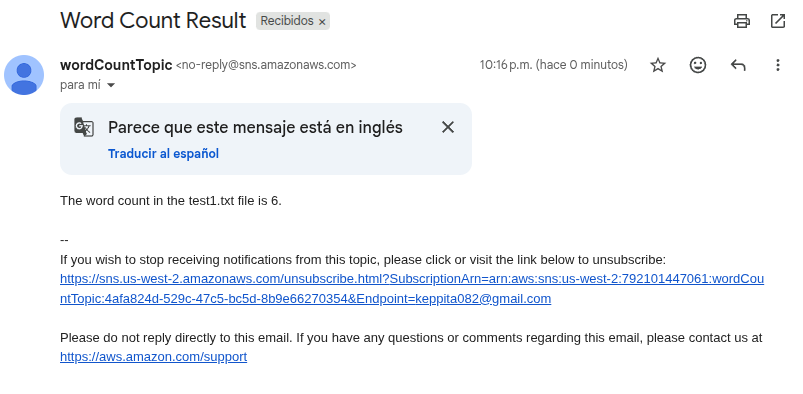
The word count in the test1.txt file is 6. Sent with subject Word Count Result from no-reply@sns.amazonaws.com.

Pipeline verification: the email is the only externally-observable signal that the full chain worked. Receiving it confirms (a) S3 fired the event, (b) IAM let the function read the object and publish to SNS, (c) the function decoded and parsed the file correctly, and (d) the subscription was confirmed before the test.

A second test file existed but was not used as evidence

A second file test2.txt with contents The word count in the test2.txt file is 14. was kept locally for format-verification purposes (its contents intentionally mirror the expected message shape). It was not the artifact used to validate the lab — the email screenshot above corresponds to test1.txt.

Key Learnings

What Was Actually Learned

The S3 → Lambda → SNS pattern as a reusable building block for event-driven processing.
How the Lambda console trigger UI sets up the S3 resource-based policy automatically.
Why urllib.parse.unquote_plus is mandatory when reading S3 event keys.
The difference between counting words with split() and a Unicode-aware regex.
Injecting configuration (the SNS ARN) via environment variables instead of hardcoding it.
SNS email confirmation is required before any message is delivered to a new endpoint.

Technical Conclusion

The lab is small in surface area but encodes the canonical serverless pattern: a managed event source (S3), a stateless compute function (Lambda), and a fan-out delivery channel (SNS). Each piece is decoupled by IAM permissions and resource-based policies, and configuration is externalised through environment variables.

The interesting engineering work is in the small details: URL-decoding event keys, choosing a regex over split(), tolerating non-UTF-8 bytes, and iterating over the Records array because S3 can batch events. These are the kind of details that fail silently in production if missed.

Gotchas worth remembering

Region

Single-region pipeline

S3, Lambda, and SNS must be in the same Region for the trigger UI to find the bucket and avoid cross-region IAM complications.

Silent failure

Unconfirmed SNS subscription

Lambda will succeed and CloudWatch will log a published message, but no email will arrive. Always confirm the subscription before testing.

Encoding

S3 keys are URL-encoded

Spaces become + or %20. Always run unquote_plus on record["s3"]["object"]["key"] before calling get_object.